Local Deployment for DV Teams
The tooling described in this series is only useful if it runs reliably in a real verification environment: NFS-mounted project directories, a heterogeneous compute farm, simulators writing to shared scratch space, a CI system nobody wants to touch. This article is about deployment: packaging the stack so that a team of ten engineers can use it without any of them needing to understand the training infrastructure, manage a Python environment, or stand up a database.
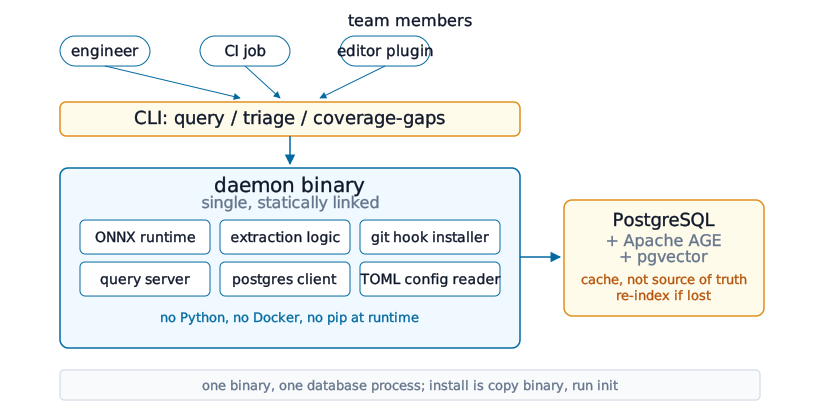
The deployment constraint
DV environments are not software engineering environments. The compute farm might still be running an old RHEL release. The project directory lives on NFS. The simulation tool ships its own Python that conflicts with the system one. The CI system was configured years ago and changing it is its own project. Any tool that requires pip install, conda, Docker, or a meaningful infrastructure change will not get adopted, no matter how good it is. The deployment story has to be: one binary, one database process, zero Python at runtime.
ONNX Runtime as the deployment primitive
Exporting the trained GraphCodeBERT model to ONNX solves the ML deployment problem directly. The daemon links against ONNX Runtime, a C++ library, no Python, no PyTorch, and runs inference on CPU. The .onnx file ships alongside the daemon binary. Engineers never interact with any ML tooling; they interact with the daemon. ONNX Runtime adds roughly 20MB to the binary and starts in milliseconds. This is the same deployment approach used for the extractor in Teaching a Model to Read SystemVerilog, and the daemon simply inherits it.
The daemon binary
The daemon ships as a single, statically linked binary that embeds the ONNX runtime, the extraction logic, the git hook installer, the query server, and the PostgreSQL client. Installation is: copy the binary, run init in the project root, and the daemon installs its git hooks and starts the background indexing process. No package manager, no configuration wizard. Configuration is a single TOML file in the project root specifying the simulation output directory, the coverage report format, and the LLM API endpoint. Defaults cover the common case, and most projects never need to touch it.
PostgreSQL without the ops burden
PostgreSQL with Apache AGE and pgvector sounds like a heavyweight dependency, but it runs comfortably on a workstation or a small shared server, and the daemon manages its own schema migrations, nobody hand-writes SQL to keep it current. Teams can run one shared daemon instance per project, which makes the graph collaborative: one engineer’s queries don’t force a re-index for anyone else. Or an individual can run a local instance with no shared infrastructure at all. Either way, the database is a cache, not a source of truth, losing it means re-indexing the codebase, not losing data, because everything in it is derived from the RTL and testbench that are already checked into version control.
CI integration
The git hook approach from The Orchestration Gap means indexing happens on commit, before CI even starts, by the time a CI job needs graph data, the index is already current. CI jobs read from the daemon over its HTTP endpoint: the prioritized test list from Regression Triage Without Gut Feeling, assertion triage context from What LLMs Are Actually Good At in Verification. These are read-only queries against a daemon that’s already running. Adopting them means adding a couple of calls to existing job scripts, not reconfiguring the CI system itself.
What the team actually sees
The user-facing surface is a CLI that wraps the daemon’s query API: query "which agents have no covergroup", triage --commit HEAD~1, coverage-gaps --report sim/coverage/latest.xml. Nobody on the team needs to know what graph traversal, ONNX, or Apache AGE mean, they run a command and get an answer. The same query API is what a Neovim or VS Code integration would sit on top of: hovering over a class name surfaces its role in the graph, its test coverage, and what it’s connected to, without the engineer ever leaving their editor.
Next: What an AI-Native Verification Flow Looks Like, all layers together, and what actually changes for a team that uses this stack.